
REST API in Python
Get Job-ready with hands-on learning & real-time projects - Enroll Now!
In today’s digital world, web services play a vital role in software development. The ability to interact with web services is essential for developers to create powerful applications. REST APIs, which stand for Representational State Transfer Application Programming Interface, are a common type of web service used in web development. Python is a powerful and versatile programming language used to interact with web services like REST APIs. In this article, we will explore the world of Python and REST APIs and understand how Python can be used to interact with web services.
What is REST API?
REST APIs are an essential part of modern web development. They are used to enable communication between different systems, devices, and applications. REST APIs use HTTP to communicate between the client and the server. They use standard HTTP methods like GET, POST, PUT, DELETE to perform various operations like fetching data, creating data, updating data, and deleting data. Python is a popular programming language that can be used to interact with REST APIs.
REST APIs are a type of web service that is used to create APIs using the REST architectural style. These are lightweight and can be accessed using HTTP requests. REST APIs have become popular because they are scalable, stateless, and simple to use.
Here are some key features of REST APIs:
1. Resources: REST APIs use resources to represent data or objects that can be accessed using HTTP requests.
2. Uniform interface: REST APIs use a uniform interface that allows clients to access resources using standard HTTP methods like GET, POST, PUT, and DELETE.
3. Stateless: REST APIs are stateless, which means that they do not store any client information. Each request contains all the information necessary for the server to respond to the request.
4. Cacheable: REST APIs are cacheable, which means that clients can store responses for future use, reducing the number of requests made to the server.
5. Layered: REST APIs can be layered, which means that a client can interact with an API through multiple layers of intermediaries, like proxies or gateways.
REST Architecture with Diagram:
REST, which stands for Representational State Transfer, is a web service architecture that allows clients to communicate with servers through HTTP/HTTPS. The REST architecture is based on a set of principles and constraints, such as statelessness, uniform interface, and cacheability. A typical REST architecture involves clients sending HTTP requests to servers, which then respond with HTTP responses. Here’s a diagram that illustrates the architecture of a RESTful web service:
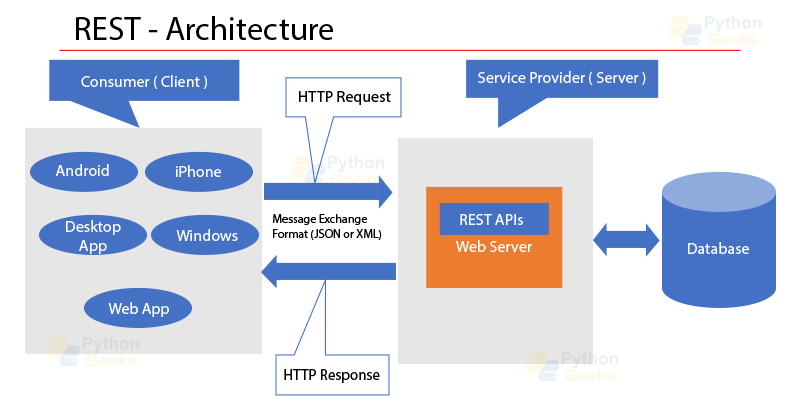
Table of Commands:
When working with REST APIs in Python, you’ll need to use the requests library to make HTTP requests to the API endpoints. Here’s a table of some common HTTP methods and their corresponding requests library functions:
| HTTP Method | Function |
| GET | requests.get(url) |
| POST | requests.post(url, data) |
| PUT | requests.put(url, data) |
| DELETE | requests.delete(url) |
Python and its Use Cases in Web Development
Python is a widely-used programming language that has a broad range of applications, spanning across different domains, including but not limited to web development. Python’s popularity is due to its simplicity, readability, and ease of use. Python has many libraries and frameworks that make web development a breeze.
Here are some of the use cases of Python in web development:
1. Web frameworks: Python has many web frameworks like Django, Flask, Pyramid, and web2py that make web development easy and fast.
2. Testing: Python has libraries like pytest and unittest that make testing web applications easy and fast.
3. Scraping: Python has libraries like BeautifulSoup and Scrapy that make web scraping easy and fast.
4. Machine learning: Python has libraries like TensorFlow and Scikit-Learn that make machine learning easy and fast.
Using Python to Interact with REST APIs
Python has many libraries that make interacting with REST APIs easy and fast. One such library is the requests library. Python provides a widely used HTTP client library known as the requests library, which is used for making HTTP requests in Python.
Here is an example of how to use the requests library to make an HTTP GET request to the DataFlair API:
import requests

response = requests.get('https://api.pythongeeks.com/sampleapi/books')
print(response.json())
In the above code, we are importing the requests library and making an HTTP GET request to the Pythongeeks API. We are printing the response as a JSON object. The requests library is straightforward to To access these web services, developers use APIs (Application Programming Interfaces), which provide a way for two different systems to communicate with each other.
Installing Requests Library
Before we begin, we need to install the Requests library. One way to install it is by utilizing pip, which is a widely used package manager for Python.
pip install requests
Making GET Requests
The GET method is utilized to obtain information from the server. We can make a GET request using the Requests library as follows:
import requests

response = requests.get('https://api.example.com/')
print(response.content)
In this example, we are making a GET request to the URL https://api.example.com/ and printing the response content.
Making POST Requests
The POST method is a type of HTTP method used to send data to a server and create a new resource or update an existing one. We can make a POST request using the Requests library as follows:
import requests

data = {'username': 'john', 'password': 'secret'}
response = requests.post('https://api.example.com/login', data=data)
print(response.content)
In this example, we are making a POST request to the URL https://api.example.com/login with the data {‘username’: ‘john’, ‘password’: ‘secret’} and printing the response content.
Handling Authentication
Some REST APIs require authentication to access certain resources. We can handle authentication using the Requests library as follows:
import requests

response = requests.get('https://api.example.com/', auth=('username', 'password'))
print(response.content)
In this example, we are making a GET request to the URL https://api.example.com/ with basic authentication using the username and password.
Handling Errors
REST APIs can return error responses for various reasons, such as invalid input, authentication failure, or server errors. We can handle errors using the Requests library as follows:
import requests

response = requests.get('https://api.example.com/')
if response.status_code == 200:
    print(response.content)
else:
    print('Error:', response.status_code)
In this example, we are making a GET request to the URL https://api.example.com/ and checking the status code of the response. If the status code is 200 (OK), we print the response content. Otherwise, we print an error message with the status code.
Writing Unit Test Code:
To write unit test code for the REST API using Flask, you can use the Python built-in library unittest.
Here is an example of how to write a unit test code for the REST API created in the code above:
import unittest
import json
from run import app

class TestApi(unittest.TestCase):

    def test_hello_world(self):
        tester = app.test_client(self)
        response = tester.get('/')
        data = json.loads(response.get_data(as_text=True))
        self.assertEqual(response.status_code, 200)
        self.assertEqual(data['Message'], 'Fine')

if __name__ == '__main__':
    unittest.main()
In this code, we import ‘unittest’, ‘json’, and ‘app’ from the ‘run’ file. The ‘TestApi’ class inherits from ‘unittest.TestCase’, and we define a method ‘test_hello_world’ to test the API’s response. In the ‘test_hello_world’ method, we create a test client using the ‘app.test_client’ method. We send a ‘GET’ request to the API endpoint (‘/’), and we check if the response status code is 200 (OK) and the JSON response message is ‘Fine’ as we defined in the ‘Helloworld’ class.
To run the test code, you can simply run the script, and the ‘unittest’ module will discover and run all the test cases defined in the file. In this example, we have only one test case, so the output will be something as below.
Output
Ran 1 test in 0.001sOK
Conclusion
In this article, we have learned what REST APIs are and how to interact with them using Python. We have seen how to install the Requests library and make GET and POST requests, handle authentication, and handle errors. With these basics, you can start exploring various REST APIs and build your own applications that interact with them.
