
OpenCV Hough Line Transform
From learning to earning – Courses that prepare you for job - Enroll now
In this article, we’ll be covering the Hough Line Transform in OpenCV. The Hough Transform is a method used in image processing tasks to locate any shape in an image if that shape is mathematically defined. Distorted or broken shapes can be detected through this algorithm. Let’s start!!!
What is OpenCV Hough Line Transform?
The Hough transform in computer vision, image analysis, and image processing performs feature extraction applications. The Hough transform technique aims to find the imperfections of the objects within the class of given shapes by a voting procedure. The procedure for voting takes place in a parameter space, where certain objects selected as candidates are identified as local maxima in the accumulator space of the Hough line algorithm for the computation of the Hough transform.
The Hough transform originally only worked for the identification of lines in an image, but now the algorithm can identify positions of various arbitrary shapes in any given image.
The input for the Hough transform is a binary edge map. The algorithm attempts to locate straight-line edges. Transformation of the edge points in the edge map obtains the possible lines that could pass through the edge point.
Performing edge detection to obtain an edge image is a crucial step in the Hough transform algorithm as the edge image is taken as input for the algorithm.
Working of Hough Line Transform
Edge detectors in image pre-processing obtain the pixels of the image that lie on the required curve in the image space. Faults or imperfections of the pixels of the image data or the edge detector, due to missing points of the mapping of the pixels on the curve may lead to spatial derivations between the ideal and the noisy edge map obtained.
The Hough transform resolves this problem by making it possible to group edge points into object candidates by carrying out an explicit voting procedure over a set of parameterized objects in the image.
1. A line is expressed with two variables in the image space
a. Cartesian coordinate system: Parameters: (m, b)
b. Polar coordinate system: Parameters: (r, θ)
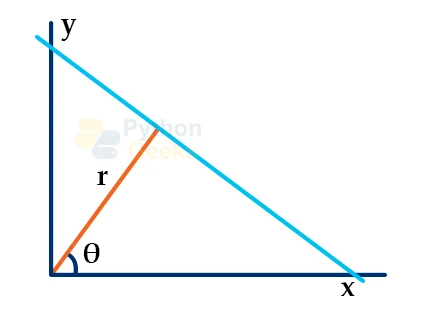
For Hough Transforms, the lines are in the Polar system. Hence, the line equation becomes:
y=(-cosθsinθ)x+(rsinθ)
r=xcosθ+ysinθ
1. For points X0 and Y0 , we can define the family of lines that go through these points as:
rθ=X0 cosθ+Y0 sinθ
Each pair of (rθ,θ) represent the line that passes through points (X0 , Y0 )
2. The family of lines for (X0 , Y0 ) gives the sinusoidal curve for points in the range r>0 and 0<θ<2π.
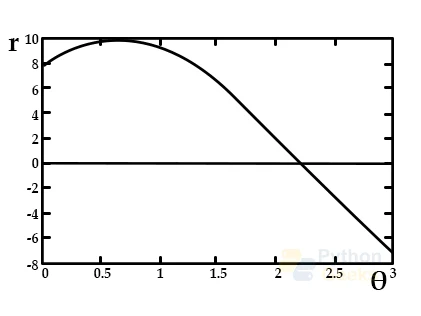
3. The intersection of curves of different points in the plane – r indicates that both points belong to the same line.
4. A line in an image can be detected by computing the number of intersections between different curves. The greater number of intersecting curves indicates that the line represented by the intersection has a greater number of points. A threshold is defined for a minimum number of intersections for an algorithm to be able to detect lines in an image.
5. Hough Line Transform keeps a record of the number of intersections between curves at each point in the image. If the number of intersections for the curves is greater than the threshold value, then the line is reinstated with parameters (θ, rθ) of the intersection point.
Algorithm for OpenCV Hough Line Transform
1. The range for ρ and θ is decided where ρ lies between [-d, d] and θ lies between the range of [ 0, 180] degrees. ‘d’ represents the length of the edge of the diagonal of the image. The value for ρ and θ is quantized to have a finite number of possible values.
2. A 2D accumulator array is created to represent the Hough space. The dimensions of the array are (num_rhos, num_thetas) and it is initialized as zero.
3. Edge Detection is performed on the input image using an algorithm.
4. Every pixel in the image is categorized into whether it is an edge pixel or not. If an edge pixel is encountered, θ is iterated through all possible values, and the value for ρ is computed. The θ and ρ index in the accumulator is determined and the accumulator base is incremented on the index pairs.
5. All values of the accumulator are looped through. If the value is greater than the threshold value, then the value for ρ and θ index is obtained. The ρ and θ pair is converted to the form of y = ax + b.
cv2.HoughLines and cv2.HoughLinesP functions in OpenCV
OpenCV has implementations of two types of Hough Line Transforms:
1. Standard Hough Transform: The standard Hough Line transform executes the standard algorithm. The result obtained is a vector couple of θ,rθ. In OpenCV, Standard Hough Transform is implemented through the HoughLines() function.
2. Probabilistic Hough Line Transform: It is an efficient way of implementing Hough Line Transform. The function returns the extremes of the detected lines (X0, X1, Y0 , Y1). In OpenCV, Probabilistic Hough Transform is implemented through the HoughLinesP() function.
Syntax
cv2.HoughLines(src, rho, theta, threshold, lines, srn, stn, min_theta, max_theta)
Parameters
- src: Source image or input image which will be modified.
- rho: Distance resolution
- theta: Angle resolution
- threshold: Threshold parameter for the accumulator. The lines which have votes above the threshold value are returned
- lines: Output vector of lines returned by voting.
- srn: Divisor for distance resolution rho for multi-scale Hough transform.
- stn: Divisor for distance resolution theta for multi-scale Hough transform
- min_theta: Minimum angle to be checked for the lines. The min_theta value must fall between 0 and max_theta.
- max_theta: Maximum angle to be checked for the lines.
Syntax
cv2.HoughLinesP(src, rho, theta, threshold, lines, minLineLength, maxLineGap)
Parameters
- src: Source image or input image which will be modified.
- rho: Distance resolution
- theta: Angle resolution
- threshold: Threshold parameter for the accumulator. The lines which have votes above the threshold value are returned
- lines: Output vector of lines returned by voting.
- minLineLength: Minimum length of a line segment below which the segment will be discarded
- maxLineLength: The maximum gap allowed between points.
Implementation
# Importing OpenCV
import cv2
# Importing numpy
import numpy as np
# Importing math
import math
# Reading the image
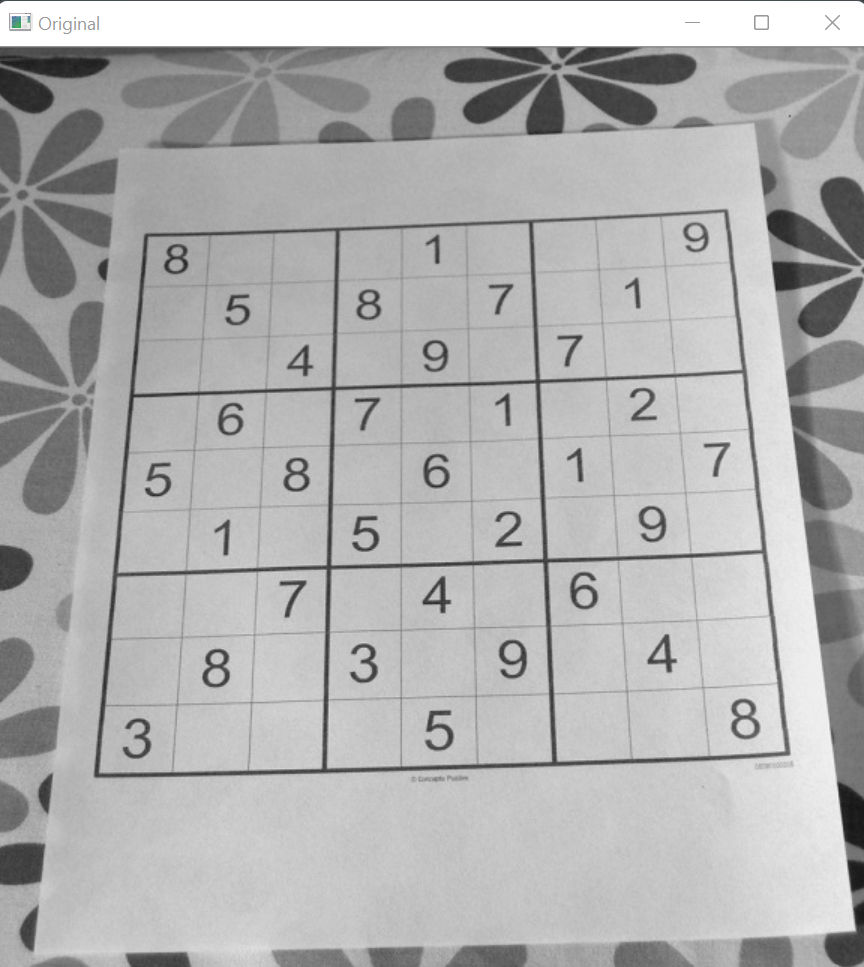
img = cv2.imread(r"C:\Users\tushi\Downloads\PythonGeeks\suduko.jpg", 0)
# Displaying the original image
cv2.imshow('Original', img)
cv2.waitKey(0)
cv2.destroyAllWindows
# Edge detection using the cv2.Canny function in OpenCV
img_canny = cv2.Canny(img, 50, 200, None, 3)
# Applying standard Hough Line Transform using cv2.HoughLines function
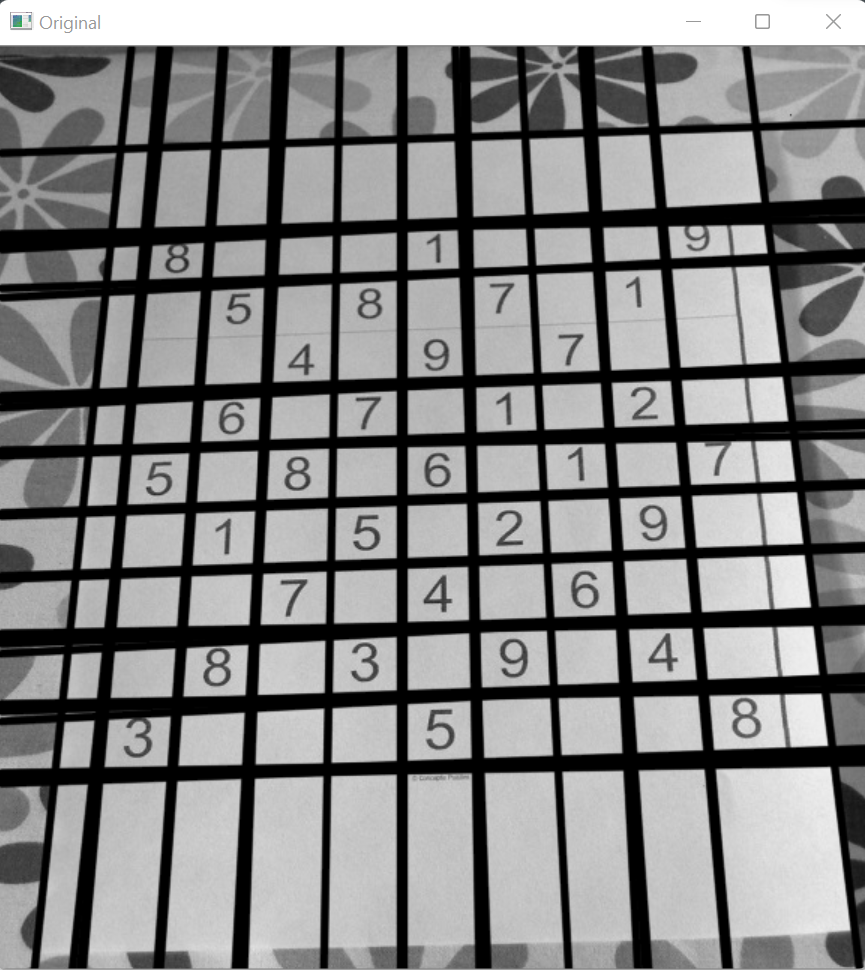
lines = cv2.HoughLines(img_canny, 1, np.pi / 180, 150, None, 0, 0)
# Drawing the lines for the Hough Line transform
if lines is not None:
        for i in range(0, len(lines)):
            rho = lines[i][0][0]
            theta = lines[i][0][1]
            a = math.cos(theta)
            b = math.sin(theta)
            x0 = a * rho
            y0 = b * rho
            pt1 = (int(x0 + 1000*(-b)), int(y0 + 1000*(a)))
            pt2 = (int(x0 - 1000*(-b)), int(y0 - 1000*(a)))
            cv2.line(img, pt1, pt2, (0,0,255), 3, cv2.LINE_AA)

# Displaying the Image
cv2.imshow('Original', img)
cv2.waitKey(0)
cv2.destroyAllWindows
Applications of Hough transform:
1. Helps in isolating the features of a particular object in the image.
2. Finds extensive use in barcode scanning and recognition.
3. Used for detecting regular curves in images.
4. Distorted or broken shapes can be detected through this algorithm.
Conclusion
In this article, we thoroughly understood what Hough Lines are in OpenCV. We learned how the Hough Line transform works and step by step went through the algorithm. Furthermore, we understood the cv2.HoughLines and cv2.HoughLinesP functions in OpenCV and implemented the Hough Line Transform in OpenCV.
