
Python Flask WTF
Upgrade Your Skills, Upgrade Your Career - Learn more
Form handling is a crucial aspect of building web applications, allowing users to input data that can be processed and stored on the server. Flask, a popular web framework for Python, provides a simple and lightweight way to build web applications. However, handling forms in Flask can be challenging due to the complexity of managing form data, validating inputs, and handling security concerns. Flask WTF (WTForms) is a powerful extension for Flask that simplifies form handling, making it easier for developers to create robust and secure web applications.
What is Flask WTF?
Flask WTF, also known as WTForms, is a Python library that provides a set of tools for handling web forms in Flask applications. It is an extension for Flask that allows developers to define forms using Python classes, which are then rendered as HTML forms. Flask WTF provides built-in support for form validation, data sanitization, and protection against cross-site scripting (XSS) attacks and cross-site request forgery (CSRF) attacks. It makes it a comprehensive solution for secure form handling in Flask web applications.
Why Use Flask WTF?
Flask WTF offers several benefits for developers when it comes to handling forms in Flask applications:
1. Simplified Form Definition:
With Flask WTF, forms can be defined using Python classes, which makes it easy to define form fields, specify validation rules, and render HTML forms. The form classes provide a clean and organized way to define form fields, making it more readable and maintainable compared to manually creating HTML forms.
2. Built-in Form Validation:
Flask WTF comes with built-in support for form validation. Developers can specify validation rules for each form field, such as required fields, minimum and maximum length, email validation, and custom validation functions. Flask WTF automatically validates form inputs based on these rules, making it easy to ensure that user-submitted data is valid and meets the required criteria.
3. Data Sanitization:
Flask WTF automatically sanitizes form data, protecting against SQL injection attacks and other security vulnerabilities. This helps to prevent malicious data from being stored or processed on the server, ensuring that the application remains secure.
4. Protection Against XSS and CSRF Attacks:
Flask WTF provides protection against cross-site scripting (XSS) attacks and cross-site request forgery (CSRF) attacks, which are common security threats in web applications. Flask WTF generates CSRF tokens automatically for each form. It validates these tokens on form submission to ensure that requests are not forged by malicious actors. Additionally, Flask WTF automatically escapes form data, preventing XSS attacks that could inject malicious scripts into the HTML output.
5. Easy Integration with Flask:
Flask WTF is designed to work seamlessly with Flask, making it easy to integrate into existing Flask applications. It provides a simple way to handle forms without adding unnecessary complexity to the application architecture.
Prerequisites
Flask-WTF is a popular extension for Flask, a Python web framework, that provides integration with WTForms, a powerful form validation and rendering library. Here’s a brief overview of the prerequisites for using Flask-WTF in a Flask application:
1. Flask:
You need to have Flask installed on your system. Flask-WTF integrates with Flask to provide seamless integration of form handling and validation in Flask applications.
2. WTForms:
WTForms is a Python library that provides a simple way to define, validate, and render HTML forms. Flask-WTF relies on WTForms for form validation and rendering. You need to have WTForms installed on your system.
3. Python:
You need to have Python, a popular programming language, installed on your system. Flask-WTF is a Python library and requires Python to be installed to work.
4. Understanding of HTML Forms:
It’s important to have a basic understanding of HTML forms and how they are used in web applications to collect and submit data. Flask-WTF uses HTML forms to render and validate user input, so understanding the basics of HTML forms is necessary.
5. Understanding of WTForms:
It’s helpful to have a basic understanding of WTForms, including how to define form classes, fields, validators, and render forms using WTForms’ syntax. This allows you to effectively use Flask-WTF in your Flask application and take advantage of its features.
How to Use Flask WTF?
Using Flask WTF is straightforward and involves the following steps:
1. Install Flask WTF:
Flask WTF can be installed using pip, the Python package manager, by running the following command: pip install Flask-WTF. This installs the Flask WTF extension along with its dependencies.
2. Import Flask WTF:
To use Flask WTF in a Flask application, it needs to be imported along with the Flask library. This can be done using the following import statement: from flask_wtf import FlaskForm.
3. Define Form Classes:
Form classes can be defined using Python classes that inherit from FlaskForm. Form fields can be defined as class attributes, and validation rules can be specified using various field types and validators provided by Flask WTF. For example, to define a form with a text input field and a submit button, the following code can be used:
from flask_wtf import FlaskForm
from wtforms import StringField, Submit, Field
from wtforms.validators import DataRequired


class Pythongeeks_MyForm(FlaskForm):
username = StringField('Username', validators=[DataRequired()])
password = StringField('Password', validators=[DataRequired()])
submit = SubmitField('Submit')
4. Render HTML Form:
Once the form class is defined, it can be rendered as an HTML form in a Flask view function. This can be done using the `render_template` function provided by Flask. For example:
from flask import Flask, render_template
app = Flask(__name__)


@app.route('/myform', methods=['GET', 'POST'])
def pythongeeks_myform():
   form = MyForm()
   if form.validate_on_submit():
       # Process form data
       username = form.username.data
       password = form.password.data
       # ... perform necessary actions with form data
   return render_template('myform.html', form=form)


if __name__ == '__main__':
   app.run()
In the above example, the pythongeeks_myform view function renders the myform.html template and passes the form object to the template context. The form object is an instance of the MyForm class, which is rendered as an HTML form in the template.
5. Handle Form Submission:
Flask WTF automatically handles form submission and validation. When the form is submitted, Flask WTF validates the form data based on the validation rules defined in the form class. If the form data is valid, it can be accessed using the form.field_name.data attribute. Form submission can be detected using the form.validate_on_submit() method, which returns True if the form has been submitted and the data is valid.
6. Add CSRF Protection:
Flask WTF automatically generates CSRF tokens for each form and validates them on form submission to protect against CSRF attacks. There is no need to manually add CSRF tokens to the form or validate them, as Flask WTF takes care of it behind the scenes.
7. Customize Form Rendering:
Flask WTF provides flexibility in customizing the rendering of HTML forms. Form fields can be rendered with different input types, attributes, and styles using the widget parameter in the form field definition. Additionally, Flask WTF supports the use of popular front-end frameworks like Bootstrap for styling forms, making it easy to create visually appealing forms.
Form Fields
| Field Name | Description |
| StringField | A text input field that represents a single line input for string values. |
| TextAreaField | A multi-line text input field that represents a textarea for entering longer text values. |
| PasswordField | A text input field that is specifically designed for password inputs, hiding the input text with asterisks or dots. |
| IntegerField | A text input field that is designed for integer values, allowing only numeric input. |
| DecimalField | A text input field that is designed for decimal or floating-point values, allowing only numeric input with decimal point. |
| BooleanField | A checkbox input field that represents a boolean value, allowing the user to toggle between true and false. |
| DateField | A text input field that is designed for date values, allowing the user to input dates in a specific format. |
| DateTimeField | A text input field that is designed for datetime values, allowing the user to input datetime in a specific format. |
| SelectField | A dropdown menu input field that allows the user to select a single value from a predefined list of options. |
| SelectMultipleField | A multiple-choice input field that allows the user to select multiple values from a predefined list of options. |
| FileField | A file upload input field that allows the user to upload a file to the server. |
| HiddenField | A hidden input field that is not visible to the user, but can store data that needs to be submitted with the form. |
| SubmitField | A submit button input field that represents a button for submitting the form. |
| FormField | A nested form field that allows embedding one form within another form. |
| FieldList | A dynamic list of fields that allows the user to add or remove multiple instances of a specific field. |
Here’s an example of how you can include all the Flask-WTF form fields in a single HTML page, along with the corresponding Python code to handle form submission using Flask.
from flask import Flask, render_template, request
from flask_wtf import FlaskForm
from wtforms import StringField, TextAreaField, PasswordField, IntegerField, DecimalField, BooleanField, DateField, DateTimeField, SelectField, SelectMultipleField, FileField, HiddenField, SubmitField, FormField, FieldList
from wtforms.validators import DataRequired


app = Flask(__name__)
app.secret_key = 'your_secret_key'


class MyForm(FlaskForm):
   string_field = StringField('String Field', validators=[DataRequired()])
   textarea_field = TextAreaField('Textarea Field', validators=[DataRequired()])
   password_field = PasswordField('Password Field', validators=[DataRequired()])
   integer_field = IntegerField('Integer Field', validators=[DataRequired()])
   decimal_field = DecimalField('Decimal Field', validators=[DataRequired()])
   boolean_field = BooleanField('Boolean Field')
   date_field = DateField('Date Field', format='%Y-%m-%d')
   datetime_field = DateTimeField('DateTime Field', format='%Y-%m-%d %H:%M:%S')
   select_field = SelectField('Select Field', choices=[('option1', 'Option 1'), ('option2', 'Option 2')])
   select_multiple_field = SelectMultipleField('Select Multiple Field', choices=[('option1', 'Option 1'), ('option2', 'Option 2')])
   file_field = FileField('File Field')
   hidden_field = HiddenField('Hidden Field')
   submit_field = SubmitField('Submit')


@app.route('/', methods=['GET', 'POST'])
def form_submission():
   form = MyForm()
   if request.method == 'POST' and form.validate_on_submit():
       string_field_value = form.string_field.data
       textarea_field_value = form.textarea_field.data
       password_field_value = form.password_field.data
       integer_field_value = form.integer_field.data
       decimal_field_value = form.decimal_field.data
       boolean_field_value = form.boolean_field.data
       date_field_value = form.date_field.data
       datetime_field_value = form.datetime_field.data
       select_field_value = form.select_field.data
       select_multiple_field_value = form.select_multiple_field.data
       file_field_value = form.file_field.data
       hidden_field_value = form.hidden_field.data

       return 'Form submitted successfully!'
   return render_template('form.html', form=form)


if __name__ == '__main__':
   app.run(debug=True)
<!DOCTYPE html>
<html>
 <head>
   <title>My Form</title>
 </head>
 <body>
   <h1>My Form</h1>
   <form method="post" enctype="multipart/form-data">
     {{ form.csrf_token }} {{ form.string_field.label }} {{ form.string_field()
     }}<br />
     {{ form.textarea_field.label }} {{ form.textarea_field() }}<br />
     {{ form.password_field.label }} {{ form.password_field() }}<br />
     {{ form.integer_field.label }} {{ form.integer_field() }}<br />
     {{ form.decimal_field.label }} {{ form.decimal_field() }}<br />
     {{ form.boolean_field.label }} {{ form.boolean_field() }}<br />
     {{ form.date_field.label }} {{ form.date_field() }}<
     <br />
     {{ form.datetime_field.label }} {{ form.datetime_field() }}<br />
     {{ form.select_field.label }} {{ form.select_field() }}<br />
     {{ form.select_multiple_field.label }} {{ form.select_multiple_field()
     }}<br />
     {{ form.file_field.label }} {{ form.file_field() }}<br />
     {{ form.hidden_field.label }} {{ form.hidden_field() }}<br />
     {{ form.submit_field() }}<br />
   </form>
 </body>
</html>
Output –
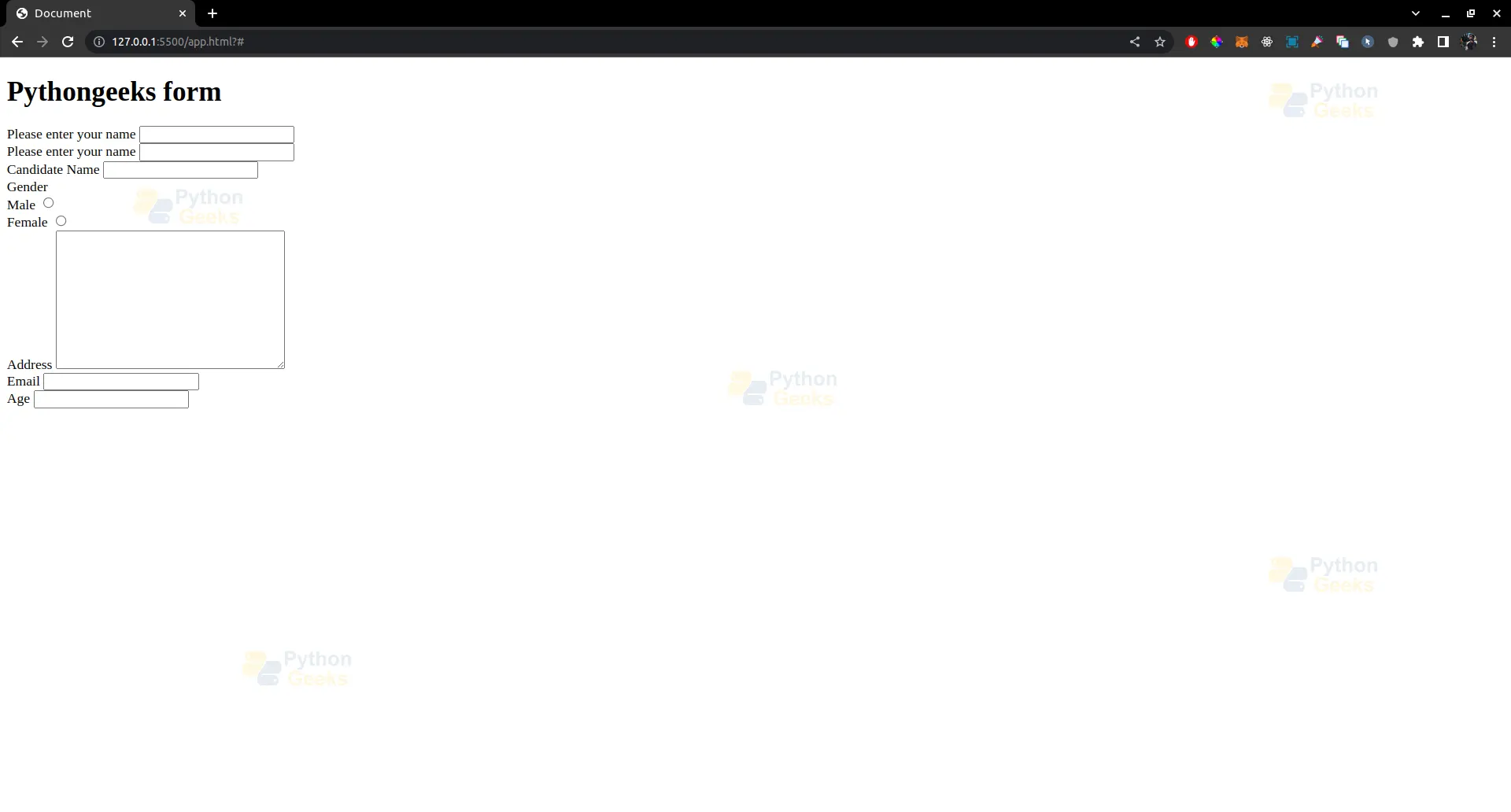
Conclusion
Handling forms in Flask web applications can be complex, but Flask WTF simplifies the process by providing a comprehensive set of tools for form handling. It includes form definition, validation, data sanitization, and protection against common web vulnerabilities.
With Flask WTF, developers can easily create robust and secure web forms, making it a valuable tool for building modern web applications with Flask. Whether you are a beginner or an experienced Flask developer, Flask WTF is a powerful extension that can streamline your form handling process and enhance the security of your web applications.
