
Template Matching using OpenCV
Upgrade Your Skills, Upgrade Your Career - Learn more
In this article, we’ll understand what template matching is in OpenCV. Template matching in OpenCV is the technique using which small parts of an image are matched with a template image. Template matching uses a sub-image called the template to find the target image which exactly matches the template.
In this article, we’ll cover:
1. What is template matching in OpenCV?
2. Working of template matching function
3. cv2.matchTemplate() function and its implementation
4. Template matching using different match modes
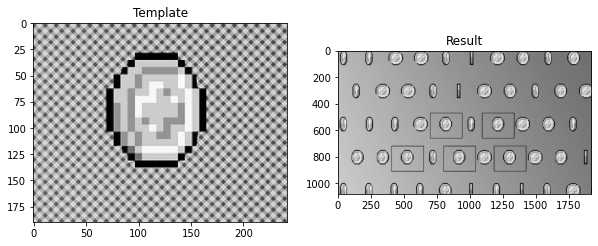
5. Template matching with multiple objects
6. Multiscaling method
7. Limitations of template matching
What is template matching in OpenCV?
Template matching in OpenCV is the technique using which small parts of an image are matched with a template image. It is used for identifying the exact location of a template in the image. In the template matching technique, the area or region of an image that matches exactly with the template image is extracted or highlighted.
Template matching works by identifying a similar patch as the template in the image. A patch is a small image with features. Two images are required to execute this method, the source image in which we’ll be searching the match for the template and the second, template image which will be compared with the regions of the image.
In OpenCV, cv2.matchTemplate function is for template matching purposes. The function slides the template over the source image or convolves the image with the template and compares the regions of the image with the template image to find an exact match. The threshold value depends on the accuracy of the match we want.
Working of template matching function
The cv2.matchTemplate function compares the template images against the regions of the images. The function slides through the source image and compares the overlapped patches of the image of size W X H against the template. The method for template matching is specified and the results of the comparisons are stored.
If the size of the input is W X H and the size of the template image is L X B, then the size of the output image is given by (W-L+1) X (H-B+1).
After we obtain the result of the comparisons, the cv2.minMaxLoc() function finds the location of the minimum or maximum value. Using the values of the height and width of the image and the template image, the height, and width of the rectangle that contains the region of the template is computed.
The result obtained by the comparisons of the template image with the regions in the image is compared with the threshold value. If the accuracy or the match value obtained is greater than the threshold value, then that particular region in the image is marked as detected.
1. cv2.matchTemplate()
Syntax
cv2.matchTemplate(image, template, method, result, mask)
Parameters
a. image: The original image for template matching. The regions of this image are compared with the template image. The image must be in 8 bit or 32-bit floating-point format.
b. template: The template image. The height and width of the template must not be greater than the source image and the data type of the template image must be the same as the source image.
c. result: It is the map of all the results of the comparisons made with the regions of the image. If the size of the input is W X H and the size of the template image is L X B, then the size of the output image is given by (W-L+1) X (H-B+1).
d. method: It specifies the method of comparison
e. mask: It specifies the mask of the template. Mask must have the same data type and size as the template image. This parameter is not set by default. Masks supported in OpenCV for template matching are TM_SQDIFF and TM_CCORR_NORMED methods.
2. cv2.minMaxLoc()
Syntax
cv2.minMaxLoc(src, mask)
Parameters
a. src: The cv2.minMaxLoc function does not work for multi-channel arrays. The src for this function is a single channel array.
b. mask: Optional parameter to select a sub-array
The cv2.minMaxLoc function returns:
- minVal: Minimum value
- maxVal: Maximum value
- minLoc: Minimum location
- maxLoc: Maximum location
Implementation of OpenCv Template Matching
# Importing OpenCV
import cv2
# Importing matplotlib.pyplot
import matplotlib.pyplot as plt
# Reading the image
img = cv2.imread(r"C:\Users\tushi\Downloads\PythonGeeks\house.jpg", 0)
# Reading the template image
img_template = cv2.imread(r"C:\Users\tushi\Downloads\PythonGeeks\house template.jpg", 0)
# Storing the height and width of the image and the template
height_1, width_1 = img.shape
height_2, width_2 = img_template.shape
# Applying the cv2.matchTemplate function on the image
result = cv2.matchTemplate(img.copy(), img_template, cv2.TM_CCOEFF)
min_val, max_val, min_loc, max_loc = cv2.minMaxLoc(result)
location = max_loc
# Creating the bounding rectangle
bottom_right = (location[0] + width_2, location[1] + height_2)
template_match = cv2.rectangle(img, location, bottom_right, (0,0,255), 5)

# Setting the grid size
plt.figure(figsize=(20,20))
# Plotting the original image
plt.subplot(131)
plt.title('Original')
plt.imshow(img, cmap='gray')
# Plotting the template image
plt.subplot(132)
plt.title('Template')
plt.imshow(img_template, cmap='gray')
# Plotting the image with the matched region
plt.subplot(133)
plt.title('Matched')
plt.imshow(template_match, cmap='gray')
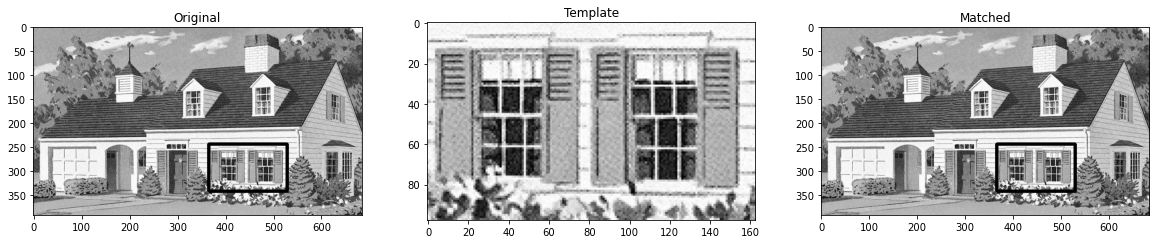
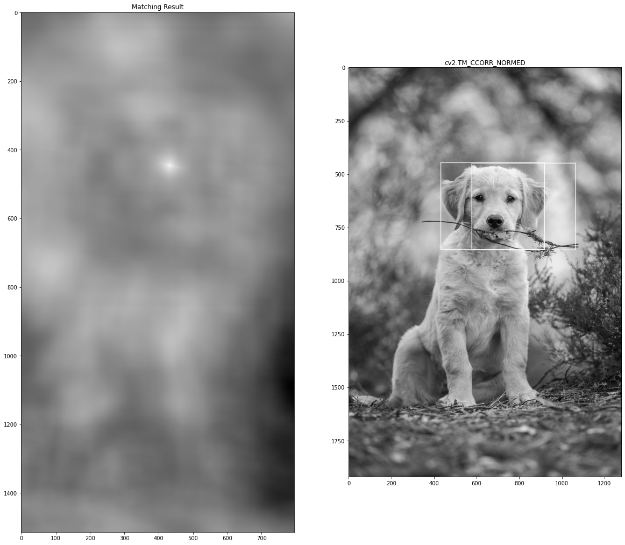
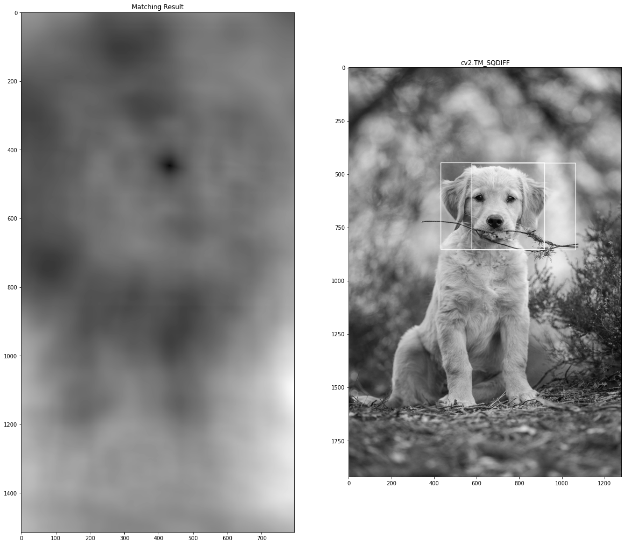
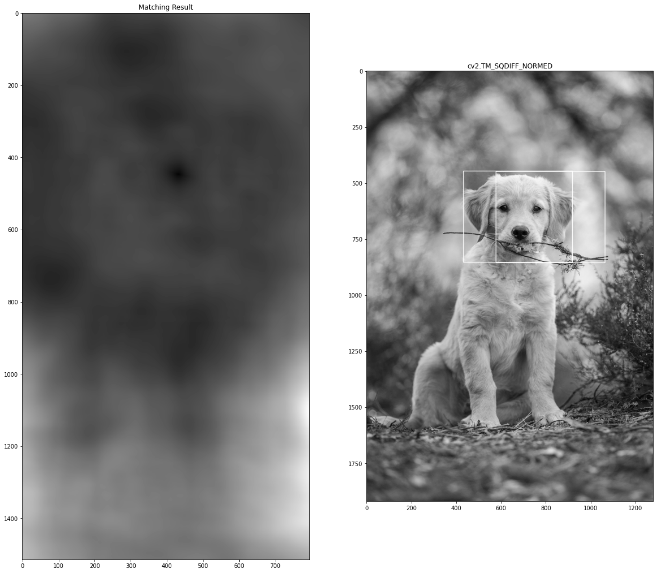
Template matching using different match modes
Implementation
# Importing OpenCV
import cv2

# Importing matplotlib.pyplot
import matplotlib.pyplot as plt

# Reading the image
img = cv2.imread(r"/content/dog.jpg", 0)

# Reading the template image
img_template = cv2.imread(r"/content/template.jpg", 0)

# Storing the different methods
methods = ['cv2.TM_CCOEFF', 'cv2.TM_CCOEFF_NORMED', 'cv2.TM_CCORR',
            'cv2.TM_CCORR_NORMED', 'cv2.TM_SQDIFF', 'cv2.TM_SQDIFF_NORMED']

# Storing the height and the width of the template image
height_1, width_1 = img.shape
height_2, width_2 = img_template.shape

for i in methods:
    img = img.copy()
    method = eval(i)

    # Applying template Matching using different methods
    res = cv2.matchTemplate(img, img_template, method)
    min_val, max_val, min_loc, max_loc = cv2.minMaxLoc(res)

    # Take minimum for TM_SQDIFF or TM_SQDIFF_NORMED
    if method in [cv2.TM_SQDIFF, cv2.TM_SQDIFF_NORMED]:
        top_left = min_loc
    else:
        top_left = max_loc

    # Creating the bounding rectangle
    bottom_right = (top_left[0] + width_2, top_left[1] + height_2)
    cv2.rectangle(img,top_left, bottom_right, 255, 2)

    # Setting the grid size
    plt.figure(figsize=(20,20))

    # Plotting the template image
    plt.subplot(121)
    plt.imshow(res, cmap = 'gray')
    plt.title('Matching Result')

    # Plotting the image with the matched region
    plt.subplot(122)
    plt.imshow(img,cmap = 'gray')
    plt.title('Detected Point')
    plt.title(i)

    plt.show()
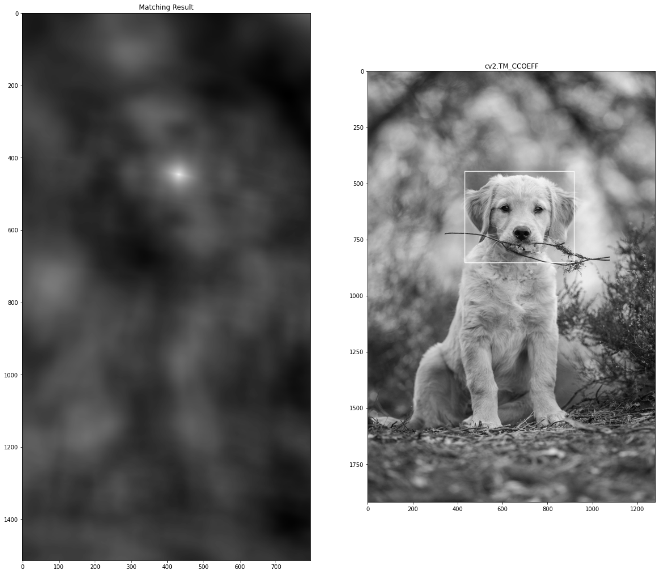
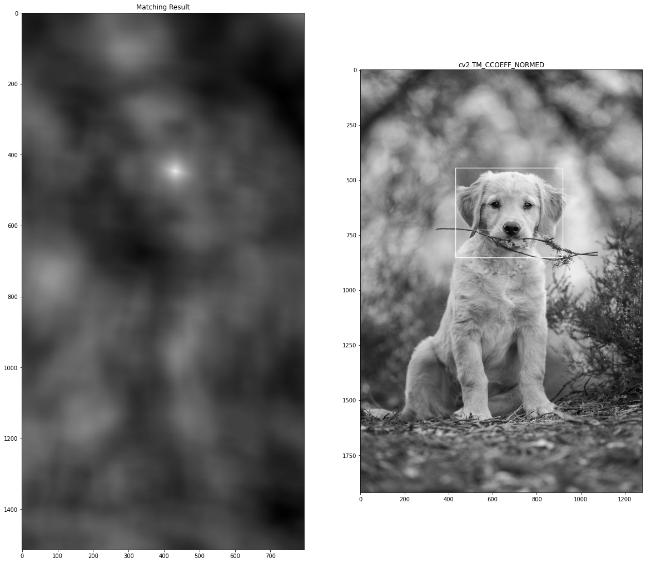
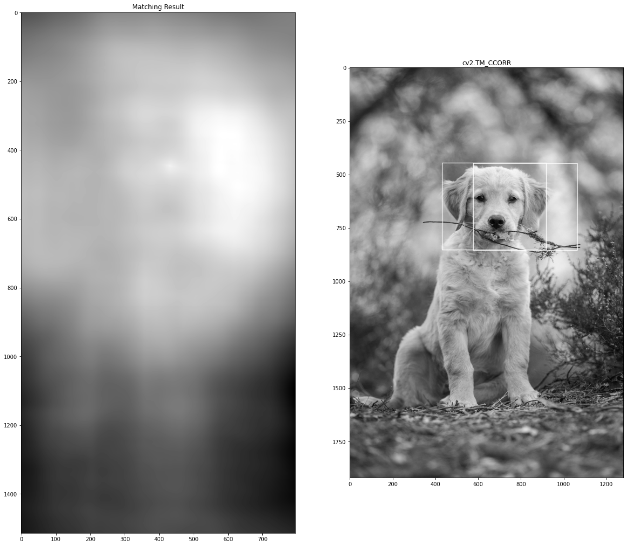
OpenCV Template Matching with Multiple Objects
# Importing OpenCV
import cv2

# Importing matplotlib.pyplot
import matplotlib.pyplot as plt

# Importing numpy
import numpy as np

# Importing imutils
import imutils

# Reading the image
img = cv2.imread(r"/content/coin.jpg", 0)

# Reading the template image
img_template = cv2.imread(r"/content/coin_template.jpg", 0)

# Storing the height and the width of the template image
height_1, width_1 = img.shape
height_2, width_2 = img_template.shape

# Apply template matching using cv2.matchTemplate function
res = cv2.matchTemplate(img, img_template,cv2.TM_CCOEFF_NORMED)

# Specifying a threshold value
threshold = 0.8

# Storing the coordinates for the matched regions
loc = np.where( res >= threshold)

# Drawing a bounding rectangle
for pt in zip(*loc[::-1]):
    cv2.rectangle(img, pt, (pt[0] + width_2, pt[1] + height_2), (0,255,255), 2)

# Setting the grid size
plt.figure(figsize=(10,10))

# Displaying the final result with multiple detections
plt.subplot(121)
plt.imshow(img_template, cmap='gray')
plt.title('Template')

plt.subplot(122)
plt.imshow(img, cmap='gray')
plt.title('Result')
Multiscaling method
We can utilize multiscaling to avoid the issue of differing sizes of the template and the source image. This doesn’t imply we can’t utilize template matching because the dimensions of the template image don’t match the measurements of the region in the image.
The multi-scaling procedure is as follows:
1. Iterate through the input image at various scales progressively decreasing the size of the image.
2. cv2.matchTemplate is used to apply template matching and to keep track of the match with the highest correlation coefficient.
3. Select the region with the highest correlation coefficient after looping through all scales as the region we have matched with.
Implementation
# Importing OpenCV
import cv2
from google.colab.patches import cv2_imshow

# Importing matplotlib.pyplot
import matplotlib.pyplot as plt

# Importing numpy
import numpy as np

# Importing imutils
import imutils

# Reading the image
img = cv2.imread(r"/content/dog.jpg", 0)

# Reading the template image
img_template = cv2.imread(r"/content/template.jpg", 0)

# Storing the height and the width of the template image
height_1, width_1 = img.shape
height_2, width_2 = img_template.shape
for scale in np.linspace(0.2, 1.0, 20)[::-1]:

    resized = imutils.resize(img, width = int(img.shape[1] * scale))
    r = img.shape[1] / float(resized.shape[1])
    if resized.shape[0] < height_2 or resized.shape[1] < width_2:
            break
    min_val, max_val, min_loc, max_loc = cv2.minMaxLoc(r)
    found = (max_val, max_loc, r)


(_, maxLoc, r) = found
(start1, start2) = (int(maxLoc[0] * r), int(maxLoc[1] * r))
(end1, end2) = (int((maxLoc[0] + width_2) * r), int((maxLoc[1] + height_2) * r))

# Drawing bounding box around the detected result
cv2.rectangle(img, (start1, start2), (end1, end2), (0, 0, 255), 2)
cv2_imshow(img)
cv2.waitKey(0)
Limitations of Template Matching in OpenCV
1. Orientation of the template image or the patch to be matched has to be preserved.
2. Template matching does not work for images that have been altered. If the image has been rotated, scaled or the size or shape of the image has changed in any way, template matching fails.
3. The template matching method fails for images of larger sizes.
Conclusion
In this article, we covered the method of template matching in OpenCV. We learned the working of the cv2.templateMatching function and understood step by step the process of executing this function in OpenCV. We implemented template matching in OpenCV and also saw the implementation using different template matching modes.
Furthermore, we implemented template matching with multiple objects and also understood the multiscaling method. We understood the limitations of template matching in computer vision applications and image processing tasks.
