
OpenCV Interview Questions with Answers
Get Ready for Your Dream Job: Click, Learn, Succeed, Start Now!
In this article, we’ll be covering the interview questions for OpenCV. These are frequently asked in the interviews. Let’s start!!
OpenCV Interview Questions with Answers
1. How to read an image in OpenCV?
Ans. The imread() function is used in OpenCV to read an image. The imread function loads an image from the specified location and returns it. If the function is unable to read the image, which can happen due to a variety of reasons such as incorrect file path, unsupported format, or improper permission to work with the file, then the function returns an empty matrix.
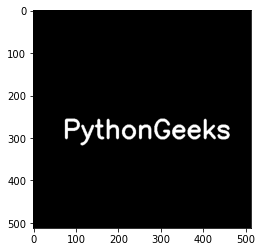
2. Write a program to embed text over an image in OpenCV.
Ans. The cv2.putText() is used to embed text over any image in OpenCV. The function cv2.putText displays the specified text data over an image in OpenCV. To put text over images, we need to specify the text data, the position of the coordinates of the image where the text will be displayed, font type and scale of the text data, and other parameters such as color, thickness, and lineType.
# Importing OpenCV
import cv2

# Importing numpy
import numpy as np

# Importing matplotlib.pyplot
import matplotlib.pyplot as plt

# Creating blank image
blank_img = np.zeros(shape=(512,512,3), dtype=np.int16)

# Displaying the blank image
plt.imshow(blank_img)

# Writing text over blank image using the cv2.putText function
font = cv2.FONT_HERSHEY_SIMPLEX
cv2.putText(blank_img,text='PythonGeeks',org=(70,300),fontFace=font,fontScale=2,color=(255,255,255), thickness=5, lineType=cv2.LINE_AA)

# Displaying the blank image with the text
plt.imshow(blank_img)
3. How can you resize an image in OpenCV?
Ans. Resizing refers to the scaling of an image. When the resizing of an image is done, the pixel information changes. Thus, resampling of the pixels is required while reducing the size of an image whereas reconstruction of the image is required while increasing the size of an image. Reconstruction means interpolation of new pixels.
The scaling size for the image can be specified manually, or scaling factor can be used. Scaling of an image in OpenCV can also be achieved using different interpolation methods.
Syntax
cv2.resize(src, dsize, dst, fx, fy, interpolation)
Parameters
src: It is the input image
dst: It is the output image. It is the size of the input image.
dsize: Output image size. It is calculated using
dsize = Size(round(fx*src.cols), round(fy*src.rows))
fx: Specifies the scaling factor along the horizontal axis
fy: Specifies the scaling factor along the vertical axis
interpolation: interpolation function used
4. What is thresholding in computer vision?
Ans. Thresholding is an image segmentation process, where a common function is applied to the pixels of an image to make images easier to analyze. The same threshold value is used for each pixel value. If pixel value is less than the threshold value, it is updated to 0, otherwise it is updated to maximum value. In OpenCV, cv2.threshold() is used for thresholding. In thresholding, an image is converted from color or grayscale into a binary image.
5. What are the different flags in OpenCV imread function?
Ans. The different flags which can be set while reading an image using the imread function in OpenCV are:
1. cv2.IMREAD_COLOR: This flag specifies to load a color image. This mode neglects the transparency of the image. It is the default flag. Integer value 1 is passed for this flag.
2. cv2.IMREAD_GRAYSCALE: It specifies the loading of an image in grayscale mode. The integer value 0 is passed for this flag.
3. cv2.IMREAD_UNCHANGED: It specifies to include the alpha channel while loading the image. Integer value -1 is passed for this flag.
6. What is meant by color space and color space conversion?
Ans. Color spaces are the representation of the color channels of the image that gives the image that particular hue. By default, the image is read in OpenCV as BGR mode and the color space is RGB.
When we refer to color space conversion, we mean representing a color from one basis to another and converting an image from one color space to another. While retaining as much similarity to the previous color space as possible to make the translated image look as similar to the original image as possible.
7. What are the flags for the global thresholding function?
Ans. The flag types for simple thresholding are:
- cv.THRESH_BINARY
- cv.THRESH_BINARY_INV
- cv.THRESH_TRUNC
- cv.THRESH_TOZERO
- cv.THRESH_TOZERO_INV
8. What is the significance of the waitKey() function in OpenCV?
Ans. It is a function that is used along with imshow() and allows the users to display a window for a specified time given in milliseconds or until any key (or the key specified in the code) is pressed. It is possible to use the imshow function without a waitkey, but the image will only be briefly displayed on the screen.
9. What is the VideoCapture operation in OpenCV?
Ans. OpenCV provides the option of reading a video interface by either capturing the live feed from the system camera or by reading a saved video file. The mode in which the video is going to be accessed is given as an argument in the VideoCapture function in OpenCV.
The VideoCapture function accepts the index of the device and video file name as the arguments. The function converts the read video into grayscale mode and saves it frame by frame.
10. What are the applications of OpenCV?
Ans. OpenCV has been used in many applications, products, and research projects. These applications include:
- Stitching images received from satellite and web maps together
- Scanning, alignment and noise reduction operations on various images.
- Object localization, detection, recognition, and analysis using the image or video as input
- Security systems and surveillance or monitoring requirements
- Camera calibrations and 3D image reconstruction
- Military applications
- Unmanned aerial, ground, and underwater vehicles
- Sound and music recognition using vision recognition techniques are applied to sound spectrogram images
11. What does the imwrite function do in OpenCV?
Ans. The imwrite function is used to store the image at a specified location. The format of the image is chosen based on the extension. If the format of the image is not supported, the image will be converted to 8-bit unsigned and will be saved in that format. The imwrite function will overwrite existing files without outputting an error or asking for confirmation.
12. Why is blurring important in image processing?
Ans. Importance of blurring in image processing:
1. Removal of noise: A high pass signal is considered as noise in an image and by application of a low pass filter to an image, the noise is restricted.
2. Removal of high-frequency content: It removes high-frequency content which might not be useful for us such as noise and edges. It reduces the details of an image and aids in the application of other algorithms to the image. By reducing the details, we can recognize other features more easily.
3. Removal of low-intensity edges: The value of image intensity change is not significant from one side of the abruption encountered to another and hence it is discarded.
13. Define Erosion and Dilation operations in image processing?
Ans. Erosion and dilation come under morphological operations. Morphological operations are a set of operations for image processing based on the shape of the image. Morphological operations are performed on binary images and require two inputs, the image to be worked and a structuring element or kernel.
The structuring element is developed on the input image given. The morphological operations aim to remove noise and settle imperfections, to make the image sharper and clearer.
Pixels are added to the boundaries of the objects in an image using dilation, whereas pixels are removed or essentially, eroded from the boundaries of the objects in an image using erosion. The number of pixels that are to be added or removed from the boundaries of the objects depend on the structuring element developed on the basis of the input image.
14. What is the difference between opening and closing morphological operations?
Ans. The opening morphological operation removes foreground pixels from the edges of an object in an image and then enhances the remaining pixels. The opening operation is an erosion operation followed by dilation. It is useful for the removal of internal noise present in an image.
The opening morphological operator is applied to protect the foreground elements that have a similar shape as the structuring element. Closing morphological operation defines the foreground pixels of the edges of an object in an image and then erodes the pixels. The opening operation can be defined as a dilation followed by erosion.
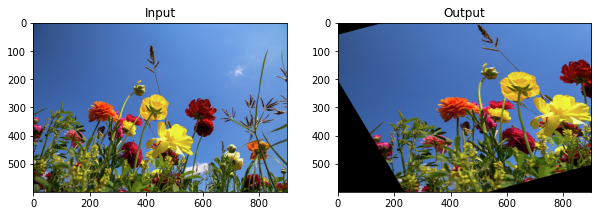
15. Write the code to execute affine transformation in OpenCV.
Ans.
# Importing OpenCV
import cv2

# Importing numpy
import numpy as np

# Importing matplotlib.pyplot
import matplotlib.pyplot as plt

# Reading the image
img = cv2.imread(r"C:\Users\tushi\Downloads\PythonGeeks\flowers.jpg")
img = cv2.cvtColor(img, cv2.COLOR_BGR2RGB)
rows, cols, ch = img.shape

# Coordinates of triangular vertices in the source image
pt1 = np.float32([[50, 50],
                   [200, 50],
                   [50, 200]])

# Coordinates of the corresponding triangular vertices in the output image
pt2 = np.float32([[10, 100],
                   [200, 50],
                   [100, 250]])

# Creating a transformation matrix
Mat = cv2.getAffineTransform(pt1, pt2)
dst = cv2.warpAffine(img, Mat, (cols, rows))
plt.figure(figsize=(10,10))

# Plotting the input image
plt.subplot(121)
plt.imshow(img)
plt.title('Input')

# Plotting the output image
plt.subplot(122)
plt.imshow(dst)
plt.title('Output')

plt.show()
16. Difference between top hat and black hat?
Ans. Top Hat, also called the white hat morphological operation, is the difference between the original input image and the image after the application of the opening morphological operation. While the Black Hat morphological operation defines the difference between the image with the application of closing morphological operation and the original input image.
17. What are the different interpolation methods available in cv2.resize function?
Ans. The different interpolation methods available in cv2.resize function are:
1. cv2.INTER_AREA: Resamples using pixel area relation. It is usually used to shrink images.
2. cv2.INTER_CUBIC: It is the Bicubic interpolation method
3. cv2.INTER_LINEAR: Used for zooming. It is the Bilinear interpolation method and it is the default interpolation function in OpenCV.
18. What is the importance of gray scaling in image processing?
Ans. Importance of Gray scaling
Reducing the dimension of the images: RGB images have three color channels and constitute a three-dimensional matrix, while in grayscale images, there is no additional parameter for color channels and are only single-dimensional.
Due to the dimension reduction, the information provided to each pixel is comparatively less.
Reduces the complexity of the model: When there is less information provided to each pixel of the image, the input nodes for the neural network will also be considerably less. Hence, this reduces the complexity of a deep learning model.
Difficulty in visualization in color images: Much more information is extracted for some images through gray scaling which might not be possible if the same algorithms or processes are applied to a color image. Features required for extraction become much more visible.
For a better understanding of image processing
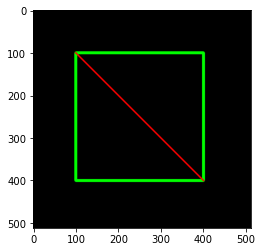
19. What is a clip line in OpenCV? Implement a program to create a clip line using the cv2.clipLine() function.
Ans. The cv2.clipLine() function returns the segment (defined by the pt1 and pt2 output points) inside the rectangle (the function clips the segment against the defined rectangle). The value for retval is False, if the pt1 and pt2 points are outside the rectangle. If some of the points given by pt1 or pt2 lie inside the rectangle, the value for retval is True.
# Importing OpenCV
import cv2

# Importing numpy
import numpy as np

# Importing matplotlib.pyplot
import matplotlib.pyplot as plt

# Creating blank image
blank_img = np.zeros(shape=(512,512,3), dtype=np.int16)

# Displaying the blank image
plt.imshow(blank_img)
# Creating a rectangle using the cv2.rectangle function
cv2.rectangle(blank_img, (100, 100), (400, 400), (0,255,0), 5)

# Creating a clipline using the cv2.clipLine function
ret, pt1, pt2 = cv2.clipLine((0,0,500,500), (100, 100), (400, 400))
if ret:
  cv2.line(blank_img,pt1,pt2,(255,0,0),3)

# Displaying the blank image with the clipline
plt.imshow(blank_img)
20. What are mouse events in OpenCV?
Ans. Mouse callback functions are created in OpenCV which carry out specific tasks when a certain mouse event occurs. Mouse events are actions of the mouse like left click, double click etc. A callback function returns the coordinates of the mouse events.
21. Define scharr operator in OpenCV?
Ans. The Scharr operator is used as a method to identify and highlight gradient edges or features of an image using the 1st derivative. It is commonly used to identify gradients along the x-axis (dx = 1, dy = 0) and y-axis (dx = 0, dy = 1).
The performance of the Scharr operator is quite similar to the Sobel operator.
The Scharr operator is an enhancement of the difference between the Sobel operator, and the two are the same as the principle of the edge of the image.
The Scharr operator increases the difference between the pixel value by amplifying the weight coefficient.
22. What is Cascade Classifier in OpenCV?
Ans. Cascade classifier is a machine learning approach where the positive and negative images are used to train a cascade function. The cascade classifier, as the name suggests, is used to classify or detect objects in images. The algorithm requires a large amount of training data images with the object to be detected and images without the object to be detected.
23. What are the different types of adaptive thresholding available in OpenCV?
Ans. The types of adaptive thresholding are:
1. cv2.ADAPTIVE_THRESH_MEAN_C: Where threshold value = (Mean of the neighboring values – constant. It is the mean of the block size of a pixel neighborhood subtracted by the constant value.
2. cv2.ADAPTIVE_THRESH_GAUSSIAN_C: Where threshold Value = Gaussian-weighted sum of the neighboring values – constant. It is a weighted sum of the block size of a pixel neighborhood subtracted by a constant value.
24. Explain the working of a kernel in image processing and how to define a kernel in OpenCV.
Ans. Kernels are matrices that perform convolution of the images. In image processing, convolution takes place when the kernel slides through each pixel and performs computations with the values of the pixel and its neighbors. The size of the convolution depends on the size of the kernel we have defined.
The new value for each pixel is calculated by positioning the anchor point of the kernel over the pixel and performing the defined calculations according to the value of the kernel.
1. The anchor of the kernel is placed on the pixel whose value is to be determined.
2. The rest of the kernel overlays the neighboring pixels of the central pixel.
3. The coefficient of the kernel is multiplied by the values of the corresponding pixels and the result is summed.
4. The value of the central pixel located at the anchor of the kernel is replaced with the result of the sum.
5. The process is repeated for all the pixels in the image.
# Importing OpenCV
import cv2

# Importing numpy
import numpy as np

# Defining kernel using numpy
kernel = np.ones((3, 3), np.float32) / 9
kernel

# Output
array([[0.11111111, 0.11111111, 0.11111111],
       [0.11111111, 0.11111111, 0.11111111],
       [0.11111111, 0.11111111, 0.11111111]], dtype=float32)
25. What are the different types of blurs available in OpenCV?
Ans. The different functions available in OpenCV to blur any image are:
1. Averaging: Averaging the blurring technique where the image is normalized. Averaging replaces the central elements with the calculated average of pixel values under the kernel area.
2. Gaussian Blurring: Gaussian blur replaces the central elements with the calculated weighted mean of pixel values under the kernel area. In Gaussian blurring, pixels closer to the central element, contribute more to the weight. Gaussian blurring is used to remove noise following a gaussian distribution.
3. Median Blurring: OpenCV provides the cv2.medianBlur() function to perform the median blur operation. Median blur replaces the central elements with the calculated median of pixel values under the kernel area. The kernel size for the median blur operation should be positive and odd. The kernel size of the median blur should be a square.
26. Define Adaptive Histogram Equalization (ALE).
Ans. The adaptive histogram equalization method makes use of an adaptive function to compute numerous image histograms, each equivalent and referring to different regions of the image. By combining these computed histograms, adaptive
Histogram equalization improves the contrasts of the image by spreading the intensity value of each pixel. Adaptive histogram equalization works better than standard function to improve contrasts of local regions and enhance the edges.
27. What is the application of the Sobel operator in OpenCV?
Ans. The Sobel operator sometimes called the Sobel–Feldman operator or Sobel filter is used in image processing and computer vision, particularly within edge detection algorithms where it emphasizes the edges. The Sobel Operator is a discrete differentiation operator. The operator is used to determine the approximation of the gradient of an image intensity function.
The Sobel Operator is a combination of Gaussian smoothing and differentiation. The Sobel operator determines the first, second, third, or mixed image derivatives. To calculate the derivative, a ksize X ksize separable kernel is used. The Sobel operators use two 3 X 3 kernels which are convolved with the original image to calculate approximations of the derivatives – one for horizontal changes and one for vertical.
Gradients can be calculated in a specific direction such as normalized X-direction gradient (it shows us the vertical edges) or the normalized Y-direction gradient (it shows us the horizontal edges) using the Sobel operator. Normalized gradient magnitude from the Sobel-Feldman operator shows us both the vertical and horizontal edges.
In simpler terms, we know that gradients are a change in color or intensity. So, change has to do with derivatives. We are calculating the rate of change and the kernels can calculate approximations of those changes.
28. What is Contour Hierarchy in OpenCV?
Ans. Objects can often be found in different locations in the image. However, some shapes are contained within other shapes in some cases, similar to nested figures. We refer to the outer shape as the parent and the inner one as the child in such a scenario. In this sense, the contours in an image have some sort of relationship.
We can also define how one contour is related to others, such as if it is a child of another contour or a parent. The child and parent relationship between objects in the image are termed as a Hierarchy representation of their relationship. When a form comprises other shapes, we may assume that the outside shape is the inside shape’s parent. Each contour-retrieval mode has an impact on image contour recognition and generates hierarchical results.
The findContours() function returns two values: The list of contours and the hierarchy of objects.
The contour hierarchy is represented as an array, which is made up of four different values. The values in the array are:
[Previous, Next, First Child, Parent]
Previous: This value represents the previous contour that is present at the same hierarchical level. This means that the previous value of contour 1 will always be -1.
Next: Indicates the next contour in an image that is on the same hierarchical level as the previous one.
First Child: The first child contour of the contour under consideration.
Parent: Indicates the parent contour’s index position for the contour under consideration.
29. Define Hough Line Transform.
Ans. The Hough transform in computer vision, image analysis, and image processing is used for feature extraction applications. The Hough transform technique aims to find the imperfections of the objects within the class of given shapes by a voting procedure. The procedure for voting is executed in a parameter space, where certain objects selected as candidates are identified as local maxima in the accumulator space of the Hough line algorithm for the computation of the Hough transform.
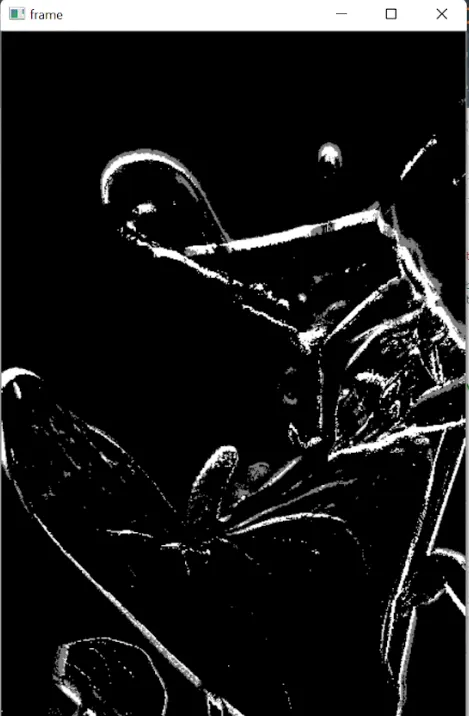
30. Explain the process of background separator in OpenCV and implement it using the Subtractor MOG2 method.
Ans. Background subtraction in image processing is a method of removing the background from an image. Essentially, the foreground of the image is extracted and the background and foreground of the image are separated. Background separation is mainly used to generate a foreground mask. The background separation technique finds its application in detecting moving objects from a sequence of frames obtained from static cameras.
The subtractor MOG2 method available in OpenCV is more efficient than the manual background subtraction method. The Subtractor MOG2 has the advantage of being able to deal with frame history.
Syntax:
createBackgroundSubtractorMOG2 cv2.createBackgroundSubtractorMOG2 (history, varTheshold, detectShadow)
Parameters:
history: This parameter refers to the number of the last frame (by default it is set to 120.)
varThreshold: This value is utilized while evaluating the difference so we can extract the foreground and remove the background. A lower threshold value ensures that greater variation in the image will be observed while it will also be more sensitive to noise.
detectShadow: It is the algorithm’s function that, if enabled, can eliminate the shadow.
Implementation
# Importing OpenCV
import cv2

# Reading the video from URL
video = cv2.VideoCapture(r"C:\Users\tushi\Downloads\PythonGeeks\pexels-mart-production-8447658.mp4")

# Initializing the background subtractor
background = cv2.createBackgroundSubtractorMOG2()

while(video.isOpened()):
    ret, frame = video.read()

    # Resizing the video
    frame = cv2.resize(frame, None, None, fx=0.2, fy=0.2)

    # Creating and applying the mask on each frame
    mask = background.apply(frame)
    cv2.imshow('frame', mask)

    # Using waitKey to display each frame of the video for 1 ms
    key = cv2.waitKey(1)
    if key == ord('q'):
        break

video.release()
cv2.destroyAllWindows()
Output: Background subtractor is applied to each frame of the video, shown below are two frames of the video.

Conclusion
In this article, we discussed the important questions with respect to OpenCV interview. Through this article, we were able to get an overview of the important topics in OpenCV.
